As-of: tested on macOS with
@openhands/agent-canvas1.23.0 (agent-server 1.49.5) on 2026-09-24/25. Agent Canvas is a beta product and its UI changes fast — if a field has moved, check the official docs; the OpenAI-compatible mechanics below still apply.
Two days ago we published a setup guide for OpenHands' classic web UI. Rajiv Shah from the OpenHands team pointed us at the newer interface — Agent Canvas — and confirmed that custom models live under Settings → LLM → Advanced, with the same three fields. He was right; this is the Canvas version, verified end to end on a real account.
Agent Canvas is the self-hosted control center for OpenHands agents: one UI for conversations and automations, with model calls routed through LiteLLM — so any OpenAI-compatible endpoint works, including Kimi K3, Moonshot AI's open-weight reasoning model. The entire setup is three fields:
Custom Model:  openai/kimi-k3
Base URL:      https://api.wallabytoken.com/v1
API Key:       your Wallaby Token key
Our full verification run below took about 40 seconds and cost ≈ $0.056 — so the $0.50 trial credit on a new account covers this guide many times over. Disclosure: Wallaby Token sells API access to Kimi K3, and the endpoint shown here is ours; every number below comes from a real run on that paid endpoint.
What you need
- A Wallaby Token API key (create an account at wallabytoken.com)
- Node.js 24 or newer — the package declares
engines.node >= 24(we ran v24.15.0) — then:
npm install -g @openhands/agent-canvas
agent-canvas   # serves the UI at http://localhost:8000
The first launch downloads the agent-server's Python dependencies automatically — a one-time cost of about twenty seconds in our environment, much faster afterwards.
One official warning worth repeating: without a sandbox, the agent can read, write, and delete everything your user account can. Create a dedicated test directory and keep every task inside it; if you plan to let the agent touch anything beyond a scratch directory, the official docs walk through the Docker-sandboxed option instead.
Setting this up for a team? One account is enough — see the Rolling out to a team section at the end.
Setup: one LLM profile
Agent Canvas keeps its model config in LLM profiles. First launch runs a short onboarding wizard — you can safely skip the "Add LLM API key" step and do it in Settings instead (your profiles live in the local backend, not in the wizard).
- Open Settings → LLM and expand your profile (there is a default one).
- Enable the Advanced toggle — the custom fields are tucked under it.
- Fill in the three fields from the block above. The
openai/prefix tells LiteLLM to speak OpenAI-compatible; the part after the slash must be exactlykimi-k3; the Base URL takes no trailing slash.
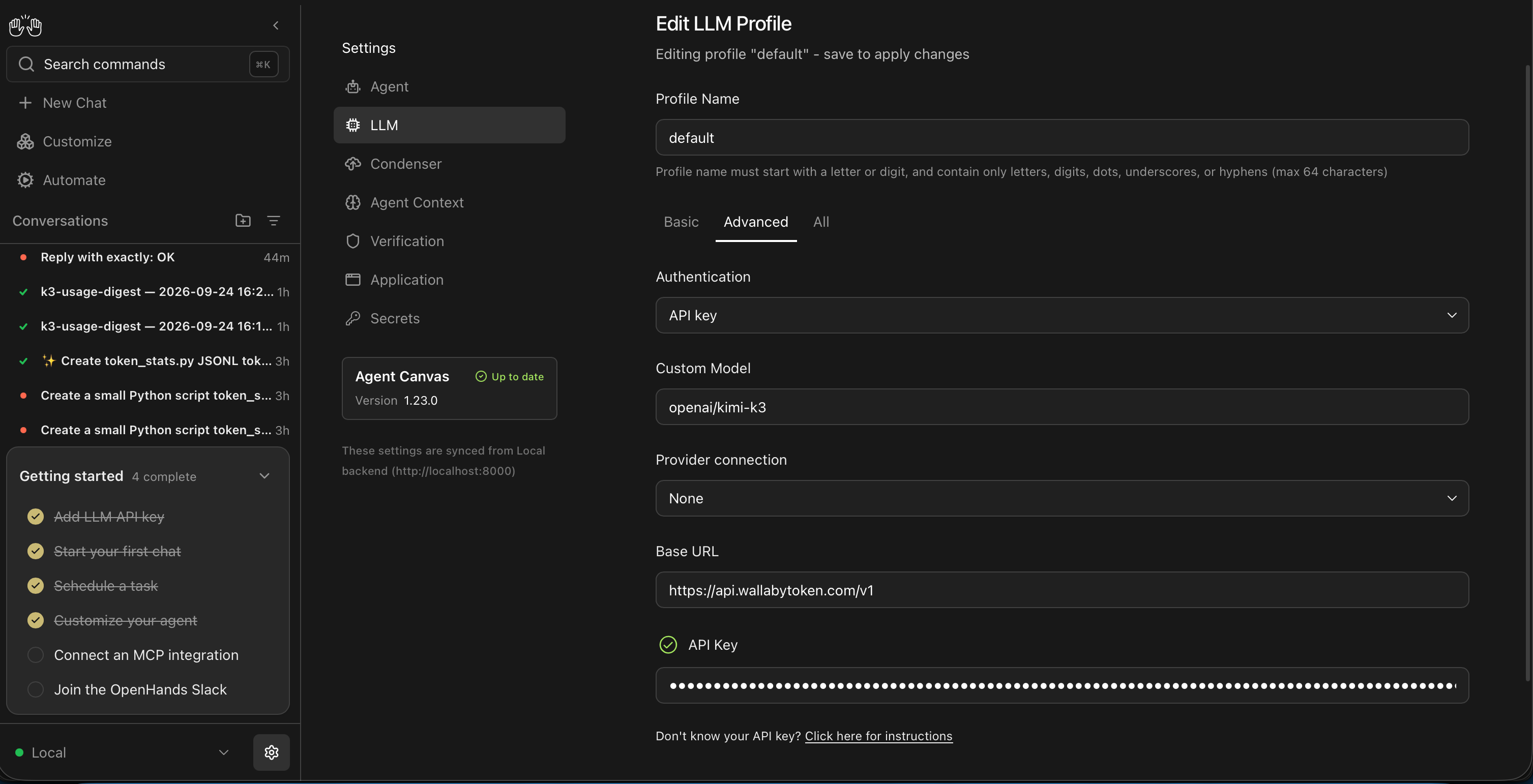
- Save. New conversations pick up the profile automatically; a running conversation keeps the model it started with. The key is stored masked.
Coming from classic OpenHands? Everything carries over
If you know the classic web UI — or followed our earlier OpenHands guide — there is nothing new to learn: same three fields, same openai/ prefix, same endpoint. An existing Wallaby key works as-is; no new account, no new key, no config file to migrate.
Two classic-UI quirks we documented in that guide, re-checked on Canvas 1.23.0:
| Classic UI behavior | On Agent Canvas 1.23.0 |
|---|---|
Conversation Metrics reports $0.0000 (LiteLLM's price map has no kimi-k3 entry) |
Unchanged — Canvas shows $0.00 for custom models; treat your provider's receipt as the bill |
| Clicking "Automations" crashed the frontend | Fixed — the Automate tab works; we ran a cron automation on it (below) |
Verify end to end — a real task, with the meter running
Skip the palindrome. A better smoke test is a small task that forces the agent to use its tools: write a script, fabricate input data, and run it.
Create a small Python script token_stats.py that reads a JSONL usage log (each line: prompt_tokens, completion_tokens, cached) and prints totals, cache-hit rate, and average completion tokens. Include a --file argument, create 5 sample lines, and run it once to verify.
Our run (Agent Canvas 1.23.0, CodeActAgent, model openai/kimi-k3) finished in about 40 seconds: the agent created the script, wrote the sample data, executed it, and reported the output. We then re-ran the script manually to confirm the numbers — they were correct.
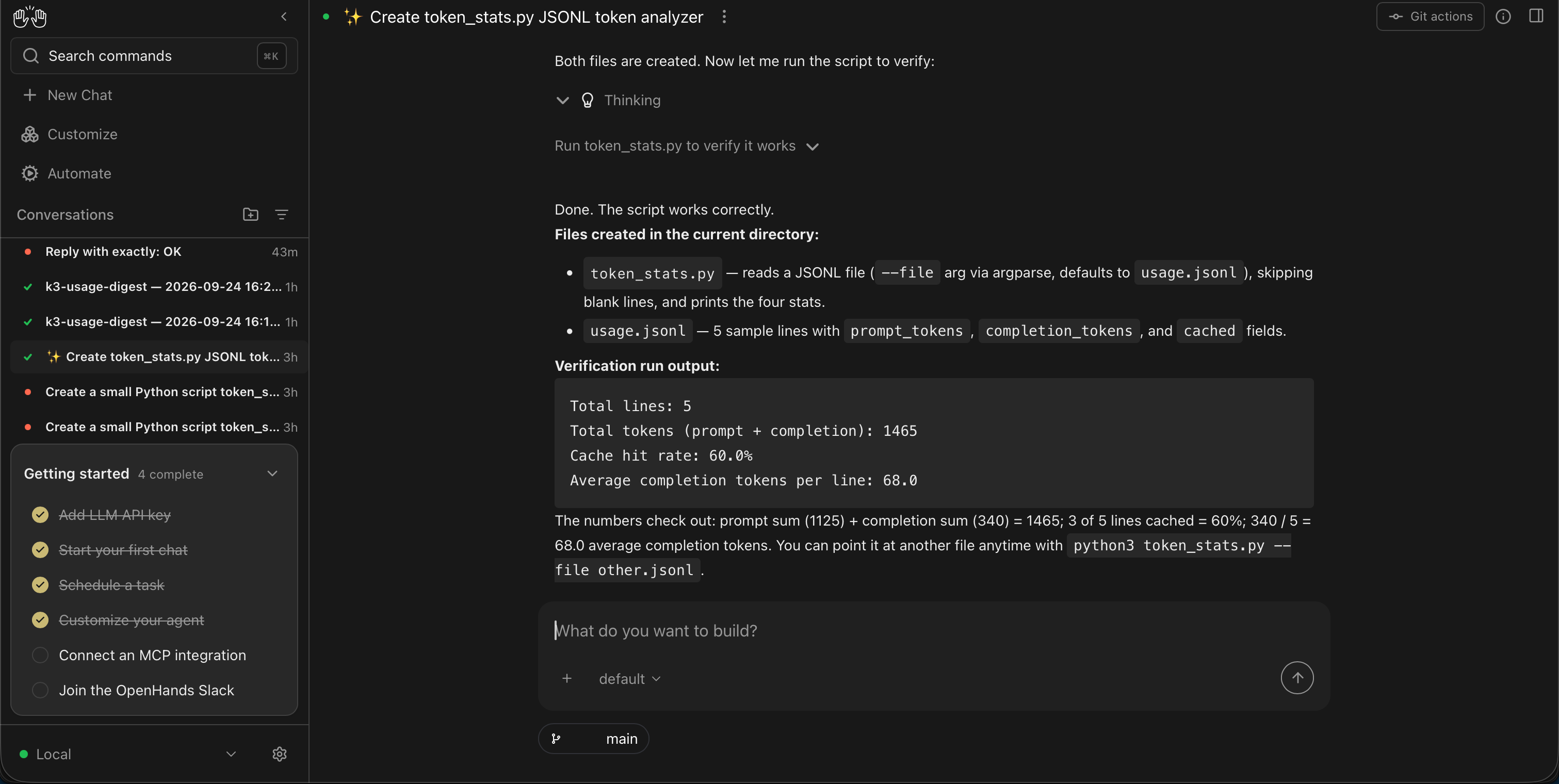
Metered on the client side for that single conversation:
| Tokens | What Wallaby charges (per 1M) | |
|---|---|---|
| Input (cache miss) | 9,598 | $2.70 |
| Input (cache hit) | 16,151 | $0.27 |
| Output (incl. 935 reasoning) | 1,900 | $13.50 |
| Total | ~27.6k | ≈ $0.056 |
Two things worth noticing. First, 62.7% of input tokens were cache reads — Agent Canvas resends the system prompt and tool schemas every step, and Kimi K3's prompt caching turns that repetition into the cheap tier; on long agent sessions the cache rate climbs further, which is where the cost advantage compounds. Second, Agent Canvas shows $0.00 for the conversation in its own UI — LiteLLM has no cost mapping for a custom openai/* model, so Canvas-side cost displays stay blank. Treat your provider's dashboard as the authoritative bill, not the agent UI. [Client-reported token counts; dollar figure computed from Wallaby's published price list, 2026-09-24]
One key, every model in the catalog
The key and Base URL above are not tied to one model. To switch models, clone the profile and change only the slug after openai/ — the key, the endpoint, and the bill stay the same for every model in the catalog. The same key also drives the classic OpenHands UI and editor agents like Cline — one prepaid balance across all of them, itemized per key (the mechanics are in One endpoint, one bill).
Automations, same meter
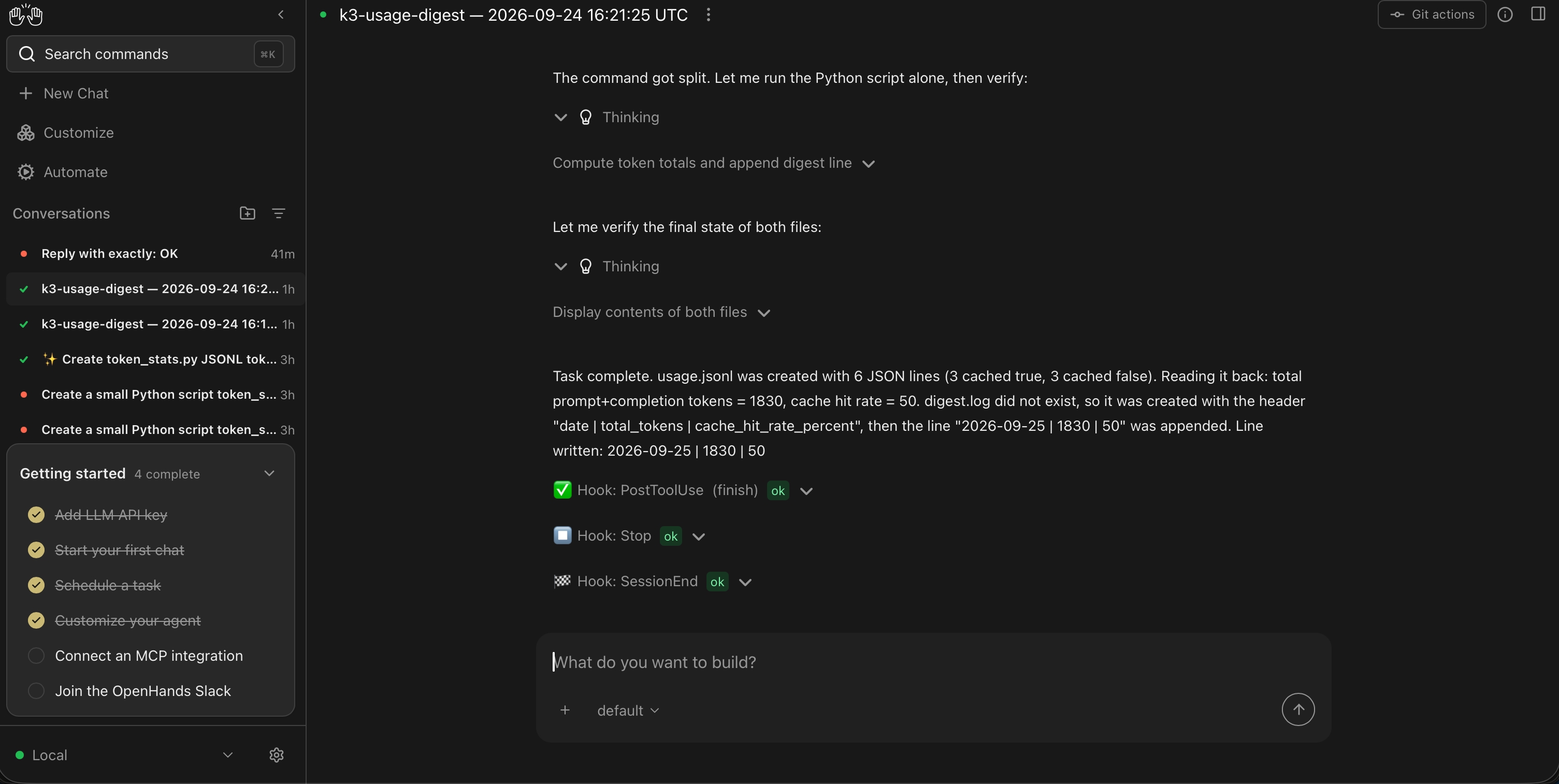
The Automate tab (left sidebar) turns prompts into scheduled agents. Local Agent Canvas currently ships cron triggers — pick a schedule, choose the LLM profile, done. The automation runs on the same profile as chat, so scheduled work lands on the same bill as everything else.
One behavioral note that matters in practice: each automation run starts in a fresh, empty workspace — files from your chat sessions are not there. Either make the prompt self-contained (have the agent create its input data first) or upload files through the automation's upload endpoint. Our first scheduled run "completed" with the agent reporting the task blocked because it couldn't find a file that only existed in a chat workspace; the self-contained version ran clean and appended its digest line correctly.
Same cost-display caveat as chat: the runs list shows cost: 0.0 for custom models — the provider receipt stays authoritative. [Agent Canvas 1.23.0, cron automation run 2026-09-25]
Gotcha: tmux warning (harmless)
If tmux is not installed, Agent Canvas logs a warning and falls back to a subprocess-based terminal. Everything still works; install tmux (brew install tmux) only if you see terminal flakiness on long sessions.
"AttributeError: 'PromptTokensDetailsWrapper' object has no attribute 'cache_creation_tokens'" — why?
This one cost us a run. If the endpoint returns cache_creation_tokens inside prompt_tokens_details, a usage-accounting path in the OpenHands SDK can crash with the error above, and the run dies on its first model response.
Root cause: the SDK checks whether the provider reported cache writes by looking at model_fields_set, but the installed LiteLLM version's wrapper class doesn't actually define that attribute — so the guard passes and the subsequent read crashes. It is a version-skew bug between the SDK and LiteLLM, not something your endpoint is doing wrong. It is already tracked upstream — canonically as software-agent-sdk #5168 (labeled ready-for-dev), with a fix in review at #5169; we confirmed it still reproduces on SDK 1.49.5 and added our trigger shape to #5134.
Workarounds as of 1.23.0:
- If your provider's endpoint does not return
cache_creation_tokens, you'll never see this. - If it does, the fix is a two-line guard in
openhands/sdk/llm/utils/telemetry.py(checkhasattrbefore reading the attribute). We applied it locally to confirm the full loop runs clean; check the OpenHands issue tracker for an upstream fix before patching. - The crash can look intermittent because it depends on the exact usage shape the endpoint returns; a provider update can flip it on or off under you.
Going further: a remote backend
Agent Canvas can also talk to a remote agent-server, which means you can run the backend on a VPS and keep agents working around the clock. That backend machine needs real CPU: tool execution — files, shells, tests — happens on the backend host; only the model inference goes out over the API. Your laptop becomes just the canvas. A follow-up post will cover moving the backend off a laptop, and wiring more automations to Kimi K3.
Rolling out to a team
Each developer runs their own local Agent Canvas, and the account side carries the team mechanics: one prepaid balance as a hard ceiling on the whole team's spend, one named key per developer with its own dollar cap and optional expiry, and usage logs itemized per key so per-person cost attribution is the default view, not a spreadsheet project. There are no seat fees: adding a teammate costs exactly their token usage. The full walkthrough is in One endpoint, one bill.
Your code, your business
Three commitments, verbatim from our privacy policy: No content logs. No training on your data. No usage reports built from your traffic. Usage lines record token counts, costs, and timing — never prompts, never completions.
Reliability you can verify
We operate a public status page so you can verify availability independently before troubleshooting your own setup. Our terms are written in plain language and publicly accessible. Wallaby Token is a registered Australian company with an ABN on file, and we run our own development workloads through the same gateway we sell — the calls behind this guide ran on it.
Get started
Create an account at wallabytoken.com (new accounts receive $0.50 in free credit; current rates are always on the pricing page), mint a key, fill in three fields. If you prefer the classic interface, the earlier guide still works as written.