As-of: tested on macOS on 2026-09-28 with
@openhands/agent-canvas1.24.0 (agent-server 1.49.6). Agent Canvas is a beta product and moves fast — the mechanics below (a conversation, a workspace, a prompt) have held steady across the 1.2x releases we’ve run.
This is the fourth post in our Agent Canvas series: setup with Kimi K3, moving the backend off your laptop, and scheduled Slack digests. This one is an experiment instead of a how-to: can an agent review code written by another agent — and how would we know?
So we ran it as a planted-bug test. One agent wrote a token-bucket rate limiter with 7 deliberate bugs. We sealed the answer key. Then a second agent reviewed the project cold. Score: 6 of 7 found, zero false positives — plus the booby-trapped test, plus 2 real bugs we didn’t plant.
The full review below ran in about three minutes and cost $0.163 in model calls. Disclosure: Wallaby Token sells API access to Kimi K3, the endpoint metered below is ours; every number comes from a real run on that paid endpoint.
Why hand the review to a second agent
The agent that writes code and the agent that reviews it shouldn’t be the same process — for the same reason you don’t proofread your own email. A fresh reviewer reads what’s actually on the page, not what the writer meant to type. In our setup the separation is real: the writer was an agent inside Kimi Work; the reviewer was Kimi K3 running in OpenHands Agent Canvas, in its own workspace, with its own tools.
One boundary we kept on purpose: the human still grades the report. The agent proposes findings; a person holding the answer key decides what’s real. That step is not optional, and nothing in this post suggests otherwise.
The setup: a rate limiter with seven secrets
The object under review is a 58-line Python token-bucket rate limiter — the classic “10 requests per second, burst up to 20” component every API developer has either written or been bitten by. It ships with a README documenting five guarantees (thread-safe; fresh keys start full; retry_after() returns seconds; per-instance buckets; burst capped at capacity) and a pytest suite of five tests. All five tests pass.
Buried in those 58 lines: seven planted bugs, chosen to be invisible to the test suite. Three examples:
retry_after()returns milliseconds, while the README and docstring promise seconds — so the README’s own usage example (time.sleep(limiter.retry_after(...))) sleeps 1,000× too long.- Fresh keys start with an empty bucket, contradicting the documented “burst allowance” — every new user’s first request is denied.
- A
threading.Lockis created in__init__and never acquired, so the “thread-safe” guarantee is decorative.
And one booby trap outside the implementation: the suite’s only concurrency test ends with except AssertionError: pass # flaky under load on CI — a test that cannot fail, guarding the race condition above. Catching it counted as bonus points. The answer key went into a sealed file before the reviewer ever saw the repo.
Here’s the whole file, exactly as the reviewer received it — if you want to play along, hunt for the seven before scrolling to the scorecard:
"""Token-bucket rate limiter for internal API workers.

Usage:
    limiter = RateLimiter(rate=10, capacity=20)   # 10 tokens/s, burst 20
    if limiter.allow(user_id):
        ...  # proceed
    else:
        wait = limiter.retry_after(user_id)        # seconds until retry

Guarantees:
- Thread-safe for concurrent workers.
- A fresh key starts with a full bucket (burst allowance).
- retry_after() returns seconds (float).
"""

import threading
import time


class RateLimiter:
    _buckets = {}

    def __init__(self, rate, capacity, clock=time.time):
        self.rate = rate          # tokens per second
        self.capacity = capacity  # max tokens in the bucket
        self.clock = clock
        self._lock = threading.Lock()

    def _bucket(self, key):
        b = self._buckets.get(key)
        if b is None:
            b = {"tokens": 0.0, "last": self.clock()}
            self._buckets[key] = b
        return b

    def _refill(self, b):
        now = self.clock()
        elapsed = now - b["last"]
        b["tokens"] = b["tokens"] + elapsed * self.rate
        b["last"] = now

    def allow(self, key, cost=1.0):
        """Consume `cost` tokens for `key` if available."""
        b = self._bucket(key)
        self._refill(b)
        if b["tokens"] >= cost:
            b["tokens"] -= cost
            return True
        return False

    def retry_after(self, key, cost=1.0):
        """Seconds until `key` can spend `cost` tokens. 0.0 if allowed now."""
        b = self._bucket(key)
        self._refill(b)
        missing = cost - b["tokens"]
        if missing <= 0:
            return 0.0
        return missing / self.rate * 1000
The run
We opened a conversation in Agent Canvas (the same LLM profile from the setup post — three fields, no other config), pointed it at the project, and gave it a senior-reviewer prompt: don’t modify anything, run the tests first, then review by reading, and write a markdown report — one row per finding, severity, file:line, what breaks, suggested fix.
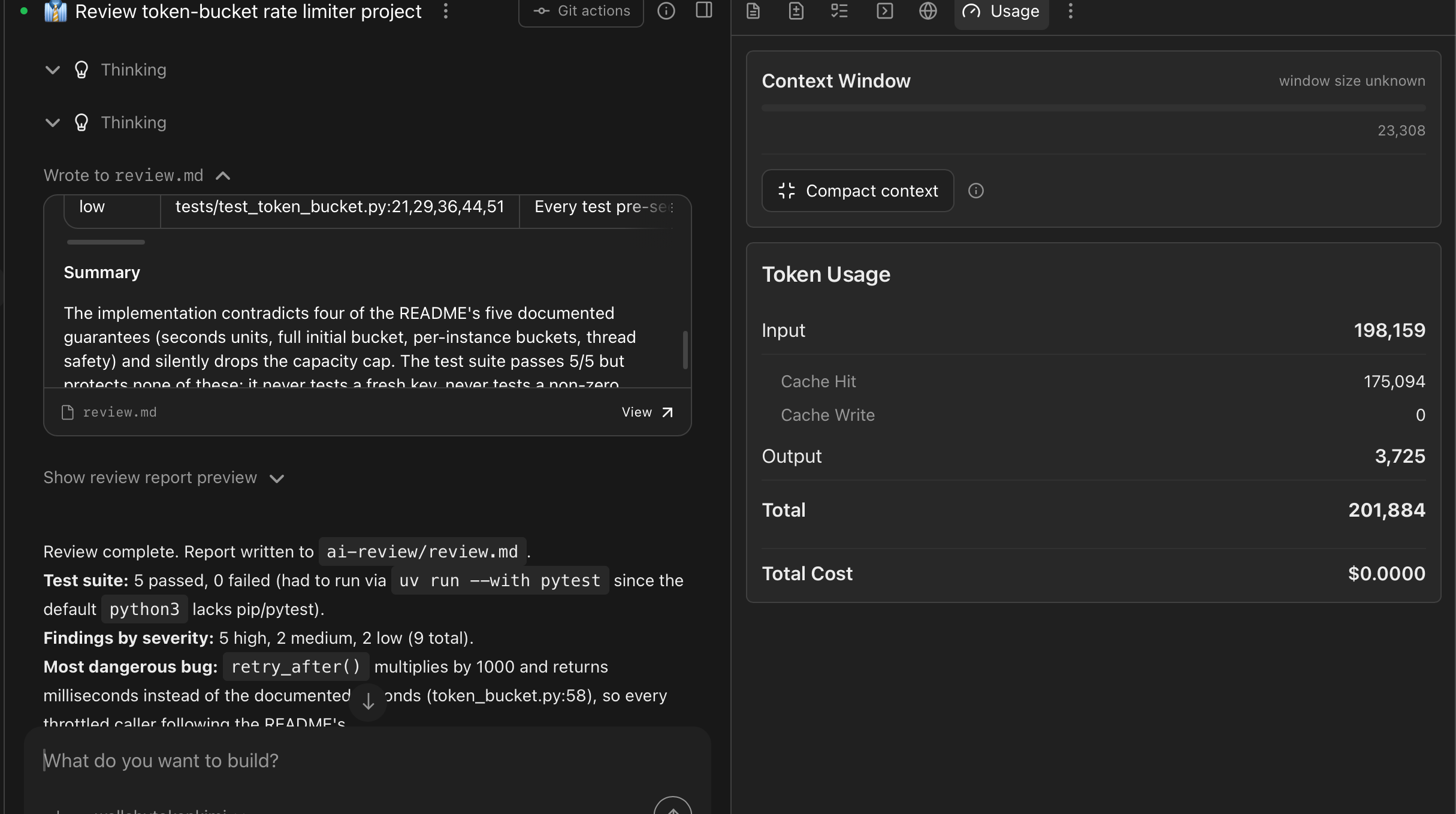
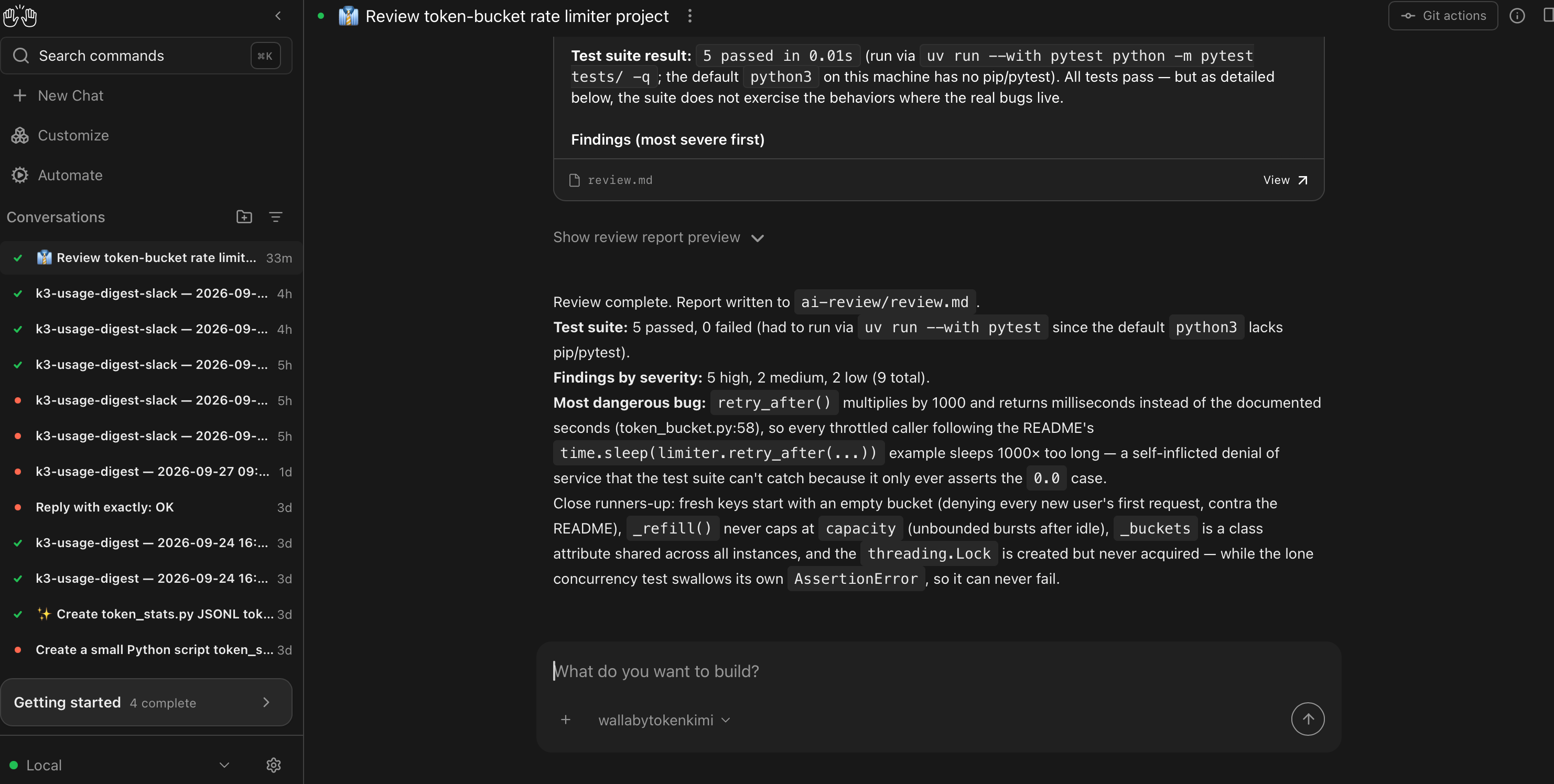
The agent ran the suite: 5 passed. (It had to improvise uv run --with pytest — the machine’s default python3 has no pytest — and said so in the report.) Then it read the code and wrote review.md. Nine findings: 5 high, 2 medium, 2 low. Its own pick for most dangerous:
retry_after()multiplies by 1000 and returns milliseconds instead of the documented seconds, so every throttled caller following the README’s example sleeps 1000× too long — a self-inflicted denial of service.
The scorecard
Here is the answer key against the report, graded by a human:
| Planted bug | Found? | Report row |
|---|---|---|
| 1. Fresh keys start with an empty bucket | ✅ | high, token_bucket.py:32 |
| 2. Clock rollback unguarded (negative elapsed) | ❌ missed | — |
| 3. Lock created but never acquired (check-then-act race) | ✅ | high, :27,42-58 |
4. rate=0 → division by zero in retry_after |
✅ | low, :23,58 |
5. _buckets is a class attribute, shared across instances |
✅ | high, :21 |
| 6. Refill never clamps to capacity (unbounded burst after idle) | ✅ | high, :39 |
7. retry_after returns milliseconds, docs say seconds |
✅ | high, :58 |
Recall: 6 of 7. The miss is the clock-rollback guard — worth reporting honestly, and worth one note in mitigation: the suite’s fake clock can only advance, so that failure class is structurally unreachable by the tests. A reviewer leaning on the suite’s coverage would never trip over it. Still a miss; the answer key doesn’t grade on excuses.
Precision: 9 of 9. Every row in the report is a real issue. No hallucinated problems, no padding.
Bonus: caught. The booby-trapped concurrency test is in the report as a medium — “the only concurrency test swallows its own failure … it can never fail” — with the extra observation that the flaky under load on CI comment “rationalizes a real bug.” That single line is the strongest argument in this post: the agent didn’t just find bugs, it caught a test lying about one.
Found 2 we didn’t plant. The report also flagged two genuine issues outside our answer key: buckets are never evicted (memory grows unboundedly in a long-running worker), and every test seeds the private _buckets dict directly — the white-box habit that makes planted bugs #1 and #5 invisible to the suite in the first place. That second one is a review of our test design, and it’s correct.
The report’s own closing summary is better than anything we’d write:
The test suite passes 5/5 but protects none of these.
The bill
The full run — test execution, code reading, report writing — took about three minutes, made 12 model calls, and used ≈ 203k tokens. On our gateway: $0.163 total.
As noted earlier in this series, Canvas shows cost: 0.0 for custom models because LiteLLM has no price entry for them — the provider’s dashboard is the authoritative bill. The Canvas usage panel did track the run faithfully: 198k input tokens, of which 175k were cache hits (88%), and 3.7k output. That cache rate is why repeat reviews of the same project get cheaper.
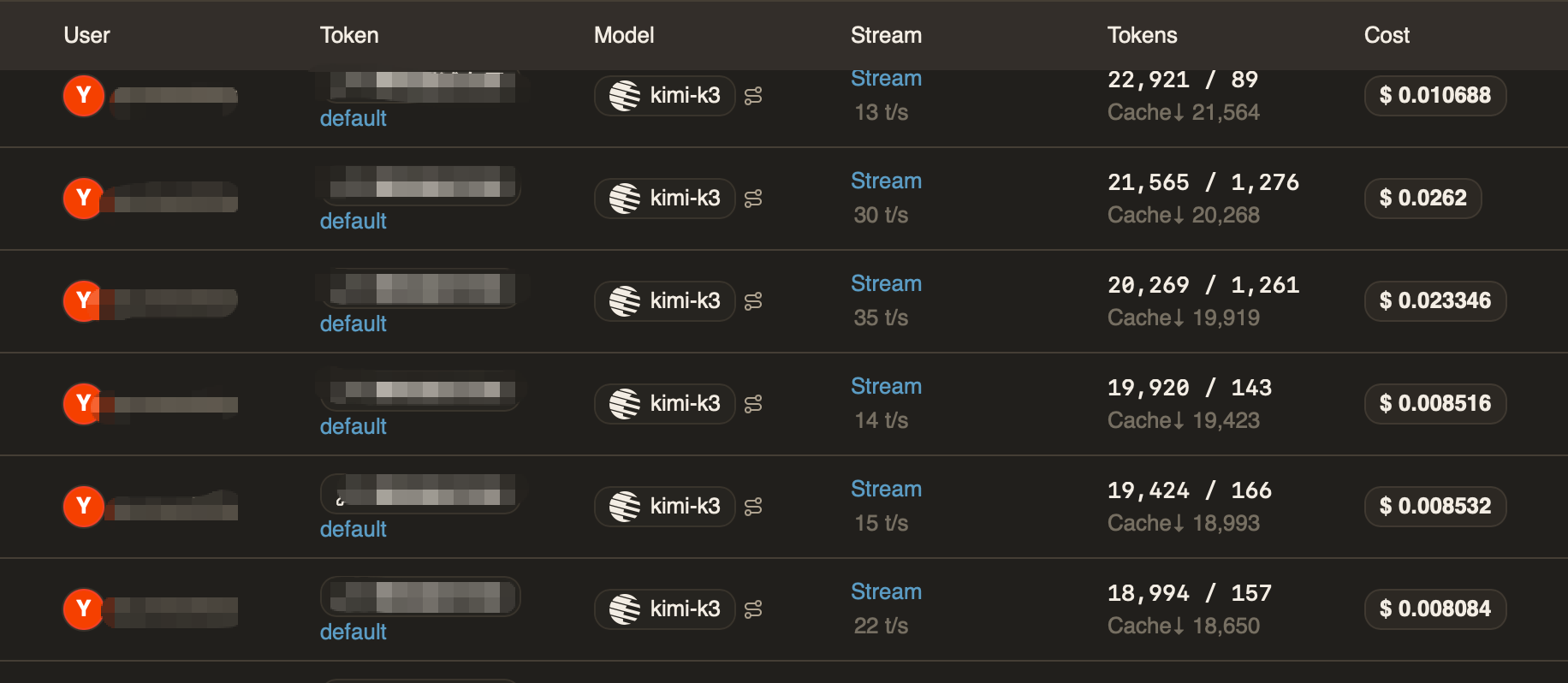
Sixteen cents for a review that catches a self-inflicted denial of service, a rigged test, and a memory leak. For comparison: the last time a 429 chain bit us, the debugging ran a lot longer than three minutes.
Where this fits
A one-off review is a demo; the durable pattern is the automation post applied to diffs: a scheduled agent that reviews the day’s changes and posts the findings somewhere you’ll read them. The prompt shape is identical — self-contained instructions, one exact output contract, a write-only destination. Whether a nightly AI review earns its sixteen cents is a judgment call per team; the point is that the plumbing doesn’t change.
And credit where due: Agent Canvas carried this experiment without friction — conversation, workspace, file output, done. For a product still labeled beta, it has become the place we run these probes first. That tracks with what we’ve seen all series: a fast-shipping team sanding down the rough edges release over release.
Rolling out to a team
Each developer runs their own local Agent Canvas, and the account side carries the team mechanics: one prepaid balance as a hard ceiling on the whole team’s spend, one named key per developer with its own dollar cap and optional expiry, and usage logs itemized per key — so when a review like this one runs, per-person attribution is already done. There are no seat fees: adding a teammate costs exactly their token usage. The full walkthrough is in One endpoint, one bill.
Your code, your business
Three commitments, verbatim from our privacy policy: No content logs. No training on your data. No usage reports built from your traffic. Usage lines record token counts, costs, and timing — never prompts, never completions. The code under review above never left the local workspace except in API calls to the model.
Reliability you can verify
We operate a public status page so you can verify availability independently before troubleshooting your own setup. Our terms are written in plain language and publicly accessible. Wallaby Token is a registered Australian company with an ABN on file, and we run our own development workloads through the same gateway we sell — the review behind this post ran on it.
Get started
Create an account at wallabytoken.com (new accounts receive $0.50 in free credit; current rates are always on the pricing page), mint a key, and point Agent Canvas at it — the setup post covers the three fields. Then give your code a second pair of eyes.