Cline's built-in model catalog has included a Wallaby provider since v4.1.19: open the provider dropdown, select Wallaby, paste the base URL and your API key, and pick kimi-k3 from the model list that loads automatically. The whole setup takes about five minutes. On older versions the OpenAI Compatible route still works, kept below as a fallback. This guide walks the built-in path first, then verifies the full agent loop — chat, file creation, and command execution — so you know tool use works, not just plain text. Disclosure: Wallaby Token sells API access to kimi-k3, and the endpoint below is ours.
What you get: a working Cline setup running kimi-k3 on your own key, with an accurate per-task cost display. Verified end to end on Cline v4.1.22 in October 2026.
Free models in Cline vs BYOK, as of October 2026
Cline runs free model promotions on what its docs describe as a rotating, limited-time basis, and the lineup changes: check the model selector for the FREE tag to see what is covered right now. Kimi K3 is also on ClinePass, Cline's flat $9.99/month subscription for open coding models. If a promotion covers what you need today, take it. This guide is the complementary path, not a competing one: a BYOK setup is worth having in parallel, for when the rotation moves on or your usage outgrows what an in-app promotion covers. We metered both paths for a full month — ClinePass models vs BYOK: what a month of Kimi K3 in Cline actually costs.
The two paths solve different problems:
| Free promotions and ClinePass | BYOK with your own API key | |
|---|---|---|
| Cost | $0 during a promotion; $9.99/month flat on ClinePass | Pay per token, see Pricing below |
| Where it works | Inside Cline's own apps | Cline plus any OpenAI-compatible client: other agents, CLIs, CI |
| Limits | Lineup rotates; usage quotas apply | Metered by your own key and your provider's rate limits |
| When the promotion ends | Re-decide under time pressure | Nothing changes; the same config keeps working |
Setting up BYOK takes about five minutes, and it turns the end of any promotion into a non-event for your workflow. The same key and endpoint also work outside Cline — the VS Code Copilot BYOK route is one example.
What you need
- A Wallaby Token API key: create an account at wallabytoken.com; new accounts receive $0.50 in trial credit. The "token" in our name is the LLM metering unit, not a crypto token.
- Cline v4.1.19 or later in VS Code. Older versions work too, through the fallback section below.
Setting this up for a team? One account is enough. See the team section at the end.
Setup: the built-in Wallaby provider
Wallaby entered Cline's built-in provider catalog in v4.1.19, one of four providers added in that release per the Cline changelog. The steps below are verified on v4.1.22.
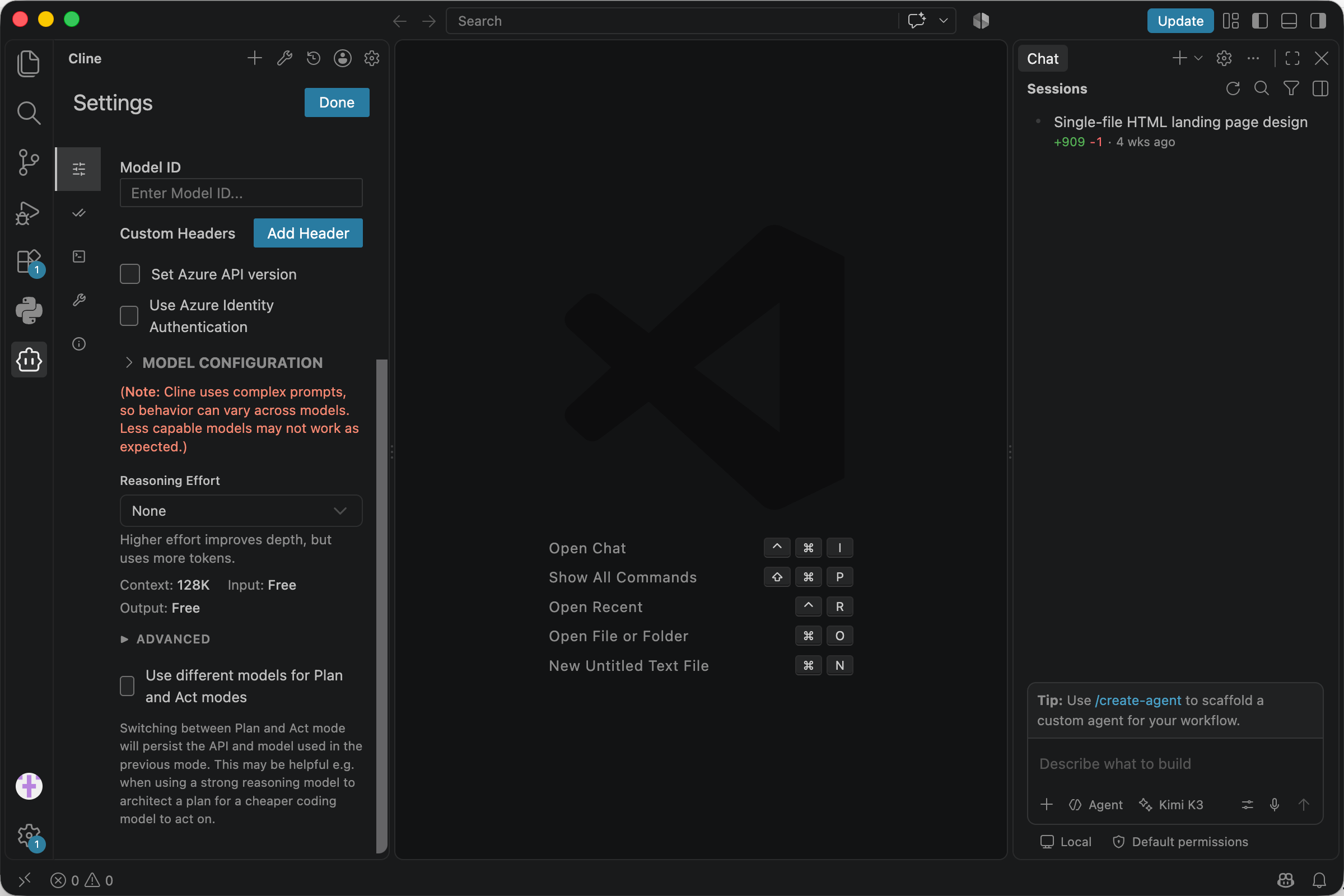
- Open the Cline panel in VS Code, click the gear for Settings, and open API Configuration. In the API Provider dropdown, select Wallaby; it sits between Wafer and xAI in the alphabetical list.
-
Every field starts empty — the built-in entry ships no prefills, so fill in the two connection fields:
-
Base URL:
https://api.wallabytoken.com/v1 - API Key: your Wallaby key
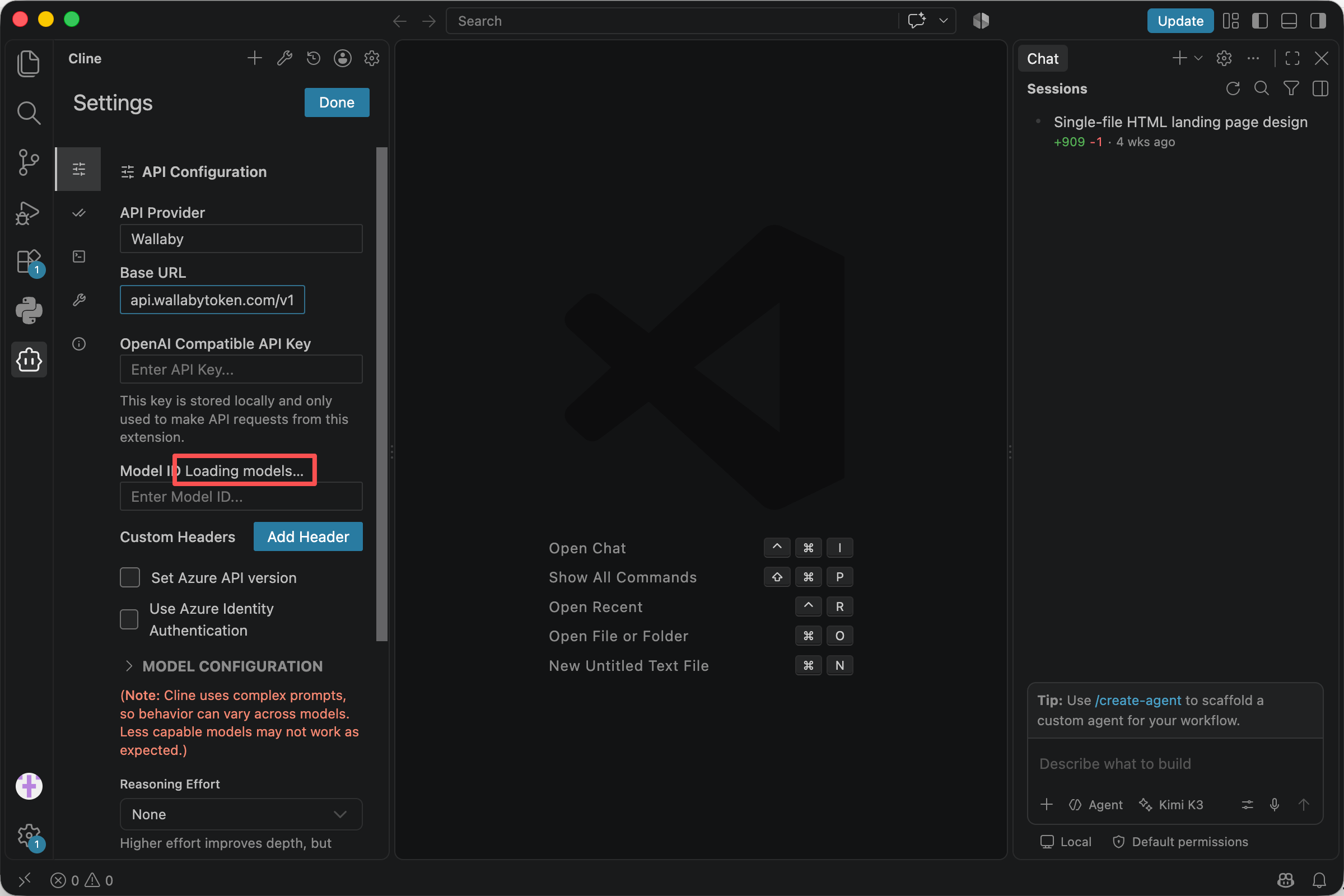
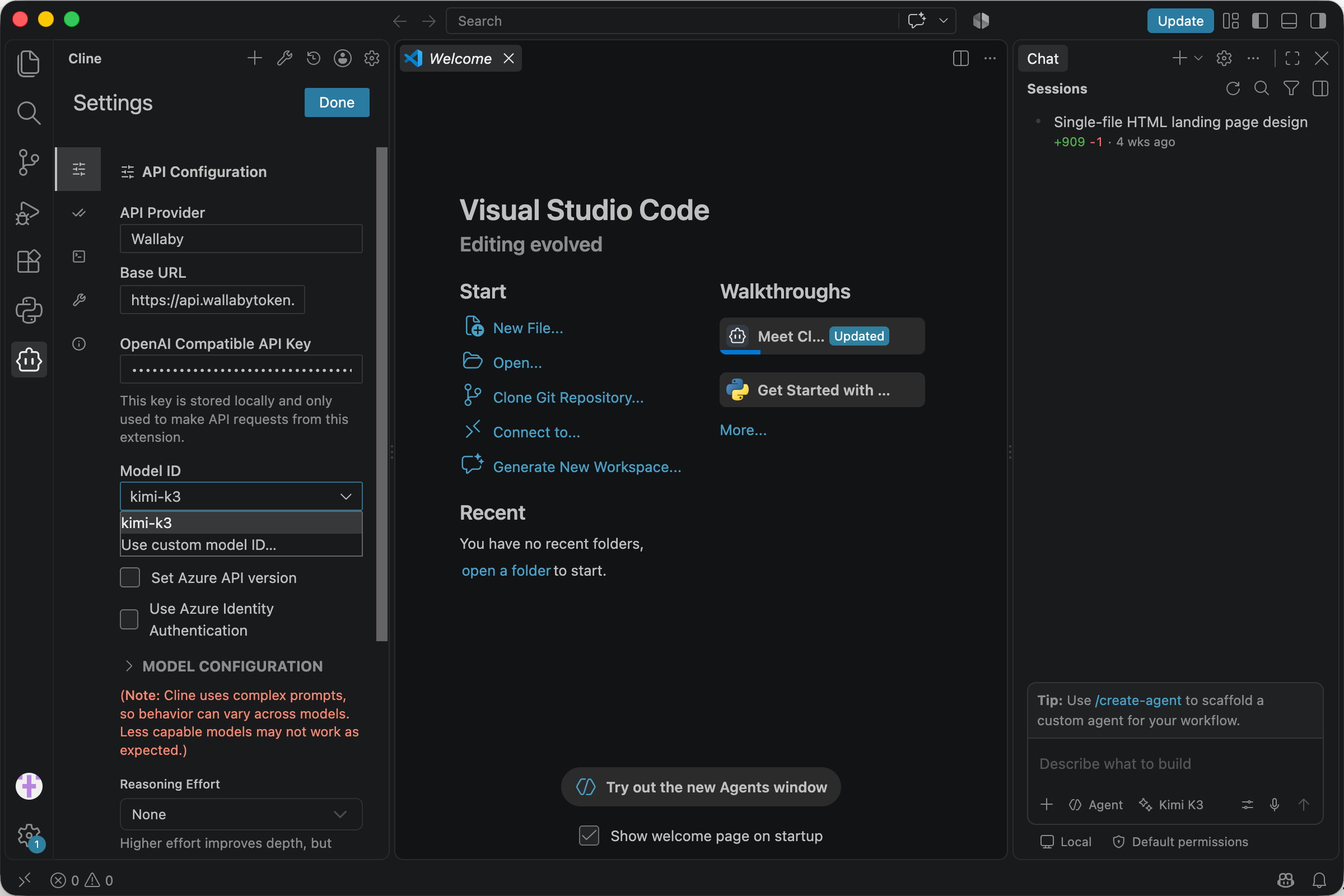
- With both in place, the Model ID field loads the model list on its own. Select
kimi-k3. The list is fetched with your key, so it never loads while the key field is empty. Usekimi-k3, notmoonshotai/kimi-k3; the longer form is the models.dev namespaced ID, not a name our gateway answers to.
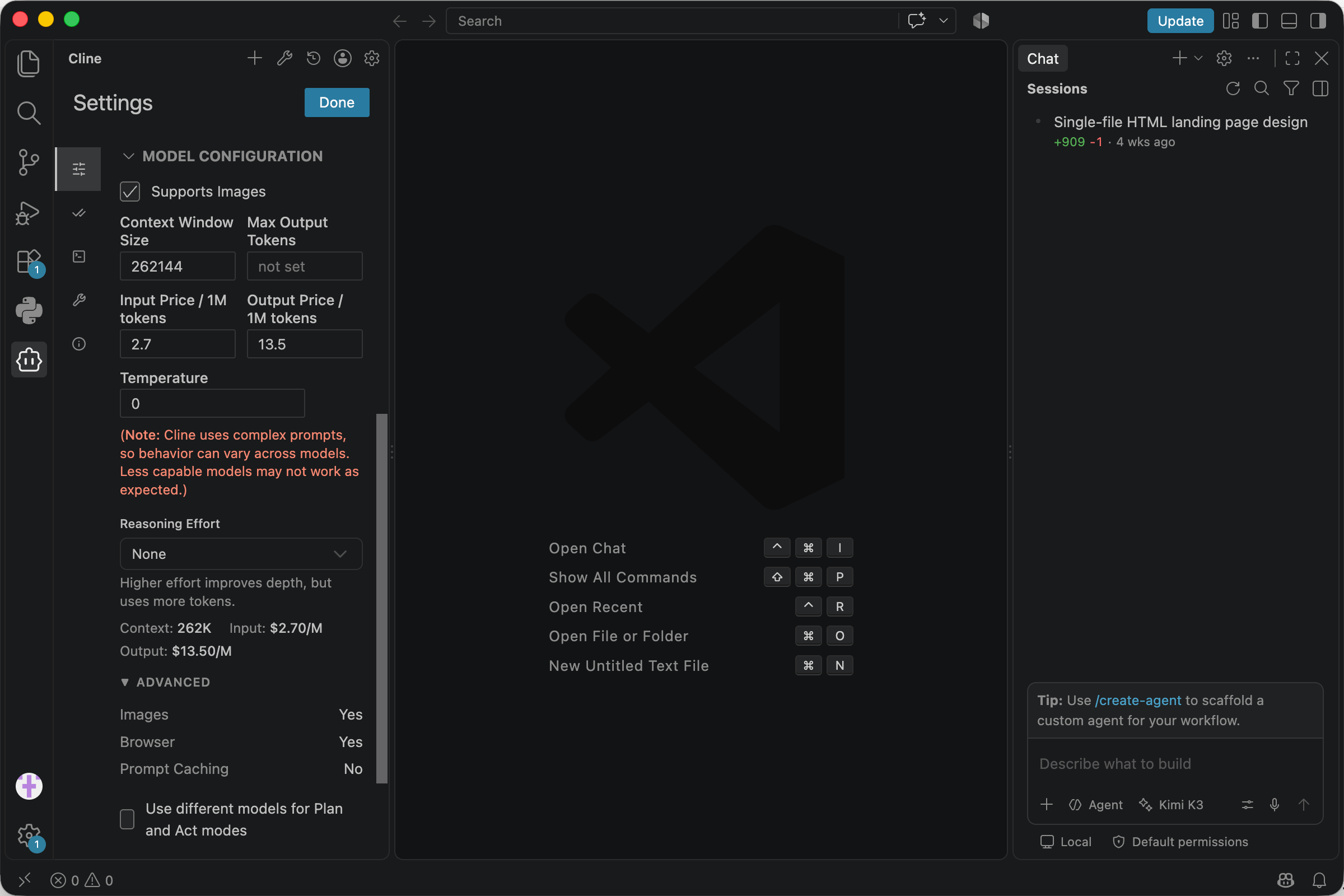
 4. Expand MODEL CONFIGURATION and set three values by hand. They do not auto-fill, and skipping them leaves you with a wrong context size and a $0.00 cost column:
- Context Window size:
262144for everyday use. kimi-k3 supports up to1048576; this value only controls when Cline starts compacting conversation history, and it applies to new tasks, not running ones. - Input Price:
2.7 - Output Price:
13.5, dollars per 1M tokens.
- Leave the Azure options unchecked and save. Cline validates the connection on the first request, so there is no separate test step.
Nothing else to configure.
Older versions: the OpenAI Compatible fallback
On Cline older than v4.1.19, select OpenAI Compatible in the provider dropdown instead. It is Cline's documented provider for third-party endpoints that implement the OpenAI chat completions API, and the same three values apply: base URL https://api.wallabytoken.com/v1, your key, and Model ID kimi-k3.
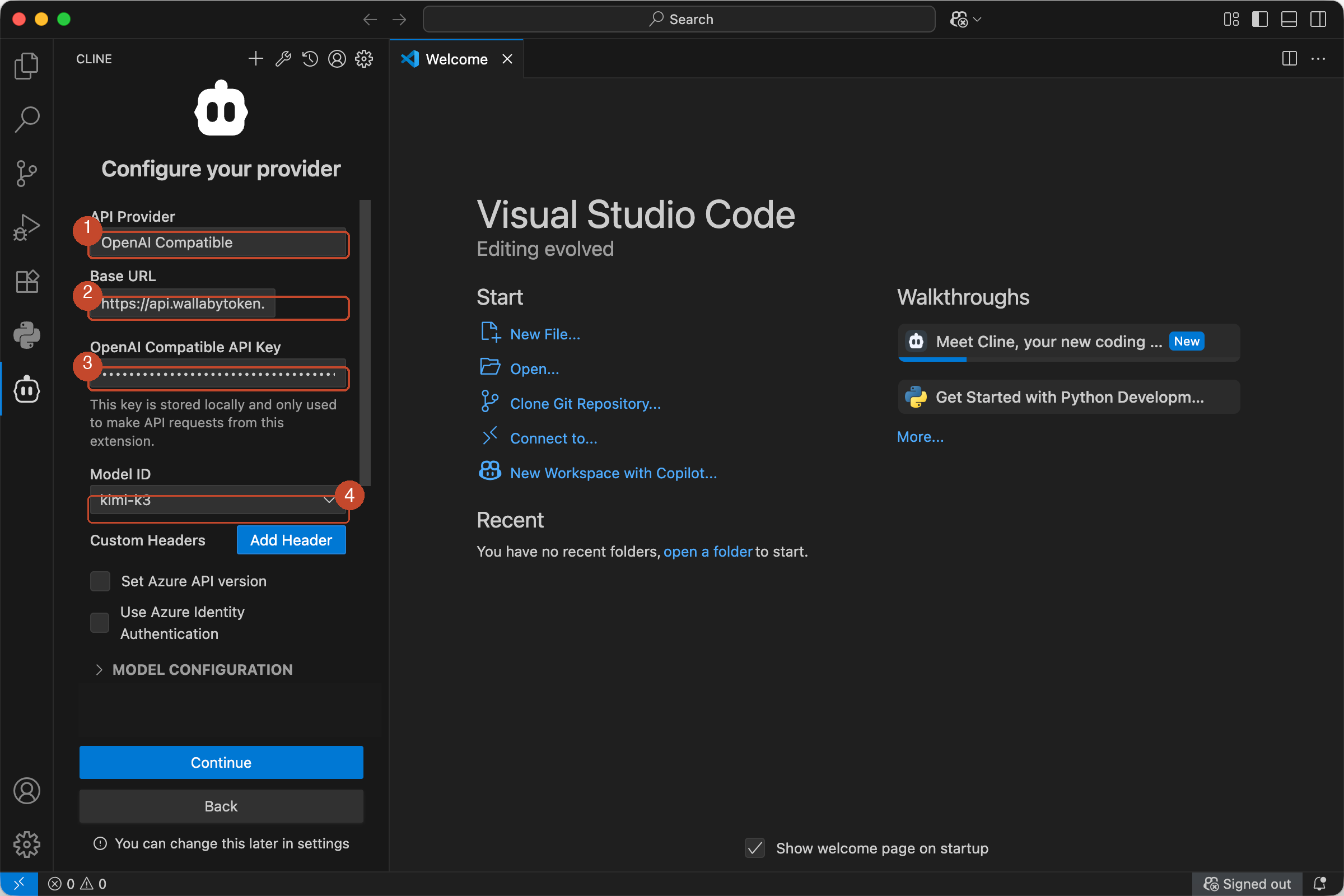
If your Cline version labels these fields differently, the provider configuration section at docs.cline.bot has the current names. The three values above are the only ones required, regardless of label.
Reasoning effort: what each level costs
MODEL CONFIGURATION also exposes a Reasoning Effort selector. We ran the same task four times on v4.1.22, once per level: a code review of a real agent-memory repository, same prompt, same workspace, charged to a test key. Gateway-side numbers:
| Effort | Output tokens | Charged | Review produced | Runtime |
|---|---|---|---|---|
| Low | 9,644 | $0.4182 | 38 lines | 6 min |
| Medium | 17,094 | $0.7240 | 92 lines | 8.5 min |
| xhigh | 23,806 | $0.8557 | 120 lines | 9 min |
| None | 35,946 | $1.4260 | 107 lines | 12 min |
How we read it:
- Low is the budget tier. Cheapest and fastest, and the 38-line review still caught the top finding.
- Medium is the daily default, roughly double the output for routine work.
- xhigh is the deep-review gear, the most thorough write-up of the four.
- None is not a money-saver. On our endpoint, none is a soft switch: easy prompts get minimal thinking, but hard problems still get plenty. It produced the largest output and the largest bill of the four runs. To spend less, pick Low, not None.
One run per level, so treat the ordering as directional rather than exact; the Low–Medium–xhigh cost ladder and None's oversized bill are the signals to act on.
One caveat on the cost column Cline shows: its per-task display does not price cache reads, because the settings UI has no cached-input price field, so it runs 21–37% below the metered total. Trust the console invoice over the client display. We break the gap down line by line in Cline + Kimi K3: every error we've hit, and the fix.
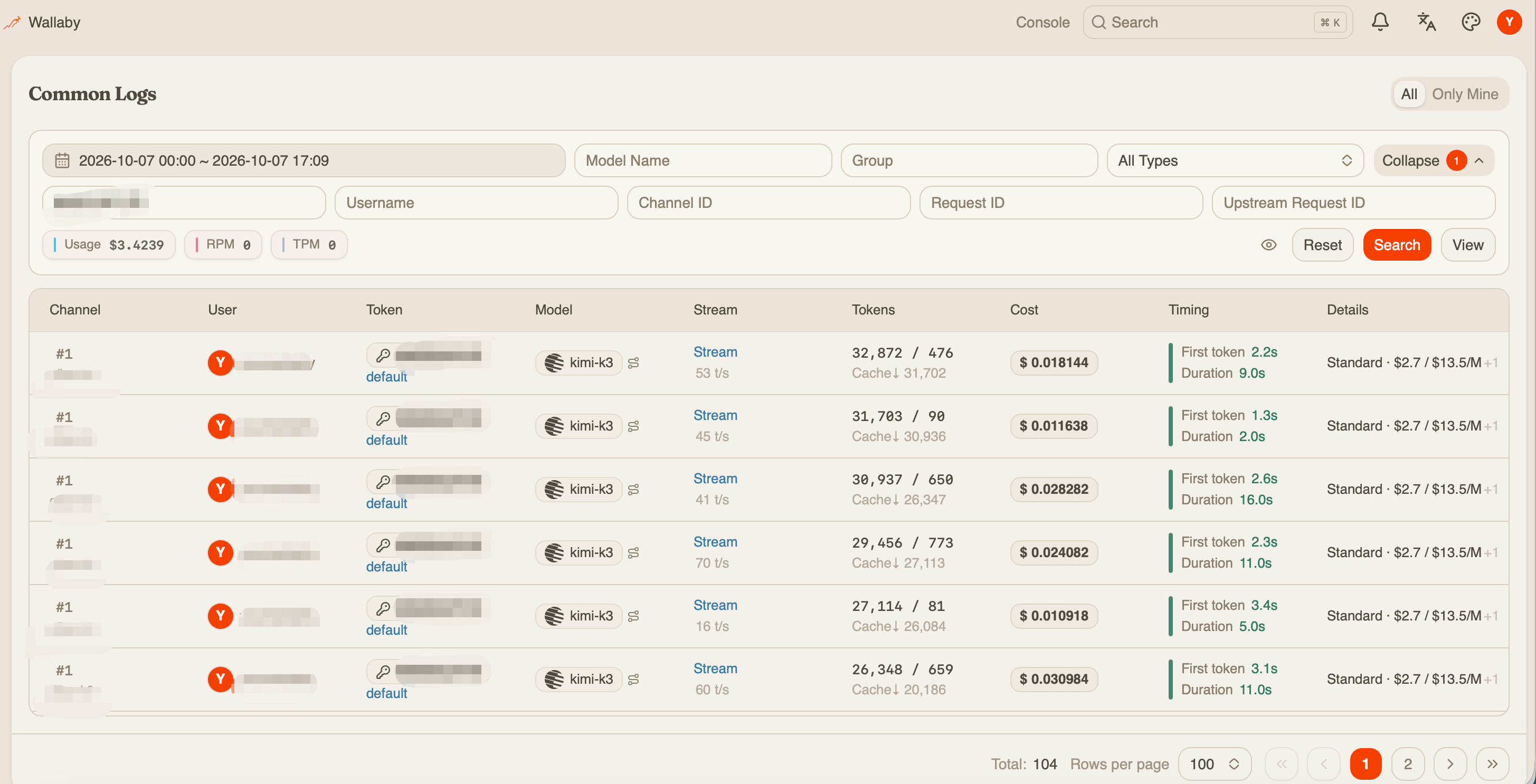
Sampling parameters are the one field you can ignore: the serving stack fixes its own, so any temperature you set is normalized rather than applied.
Verify the configuration
Start a new Cline task and enter a minimal prompt:
Create a file named palindrome.py containing a function that checks whether a string is a palindrome, ignoring case and non-alphanumeric characters, plus two test cases.
Expected result: kimi-k3 responds with a short thinking phase first, which is normal behavior for a reasoning model, not a stall, and Cline then proposes creating palindrome.py with the function and tests.
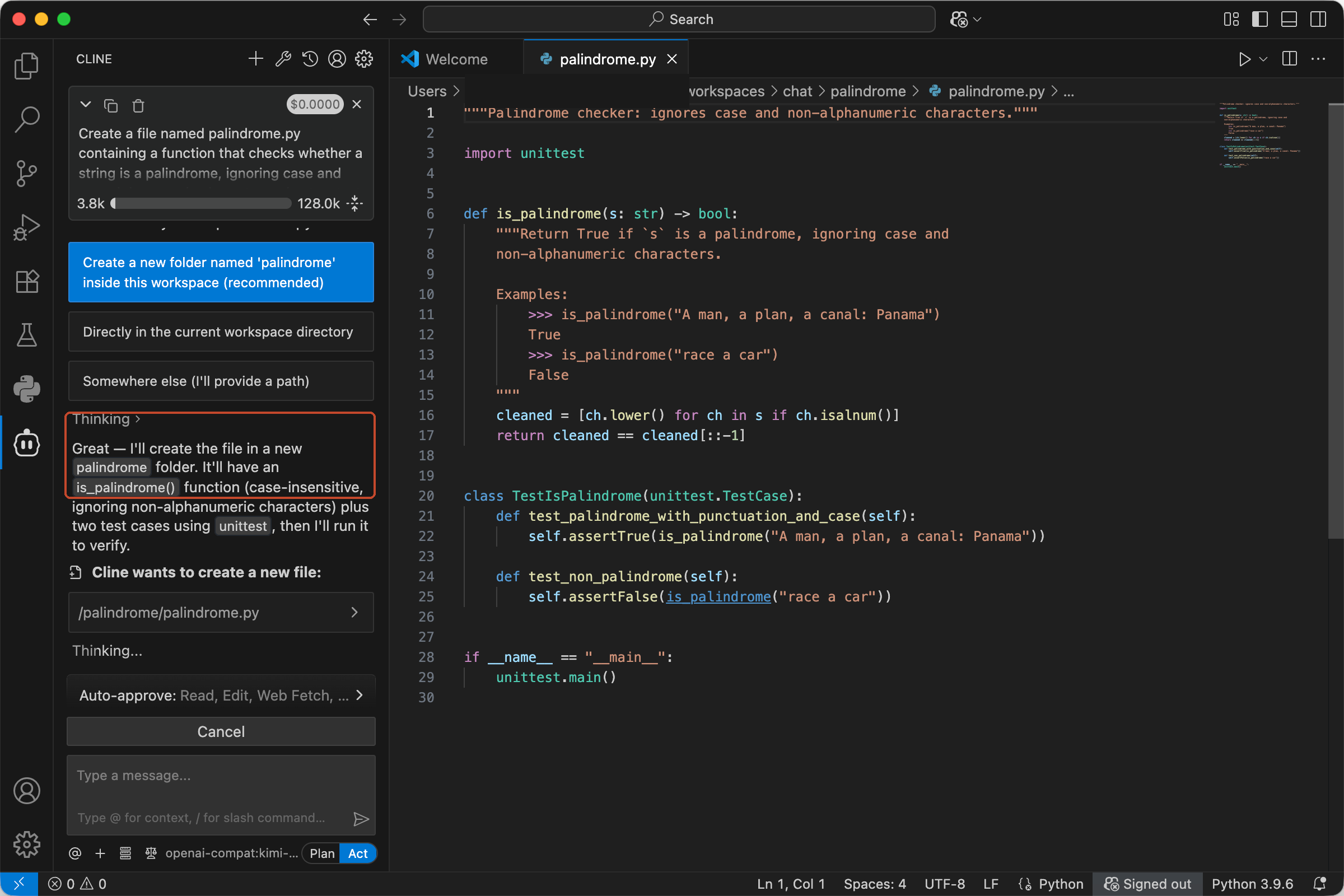
Approve the file creation, and Cline follows up by asking to run the test suite. That is the full agent loop working through the endpoint, not just plain chat.
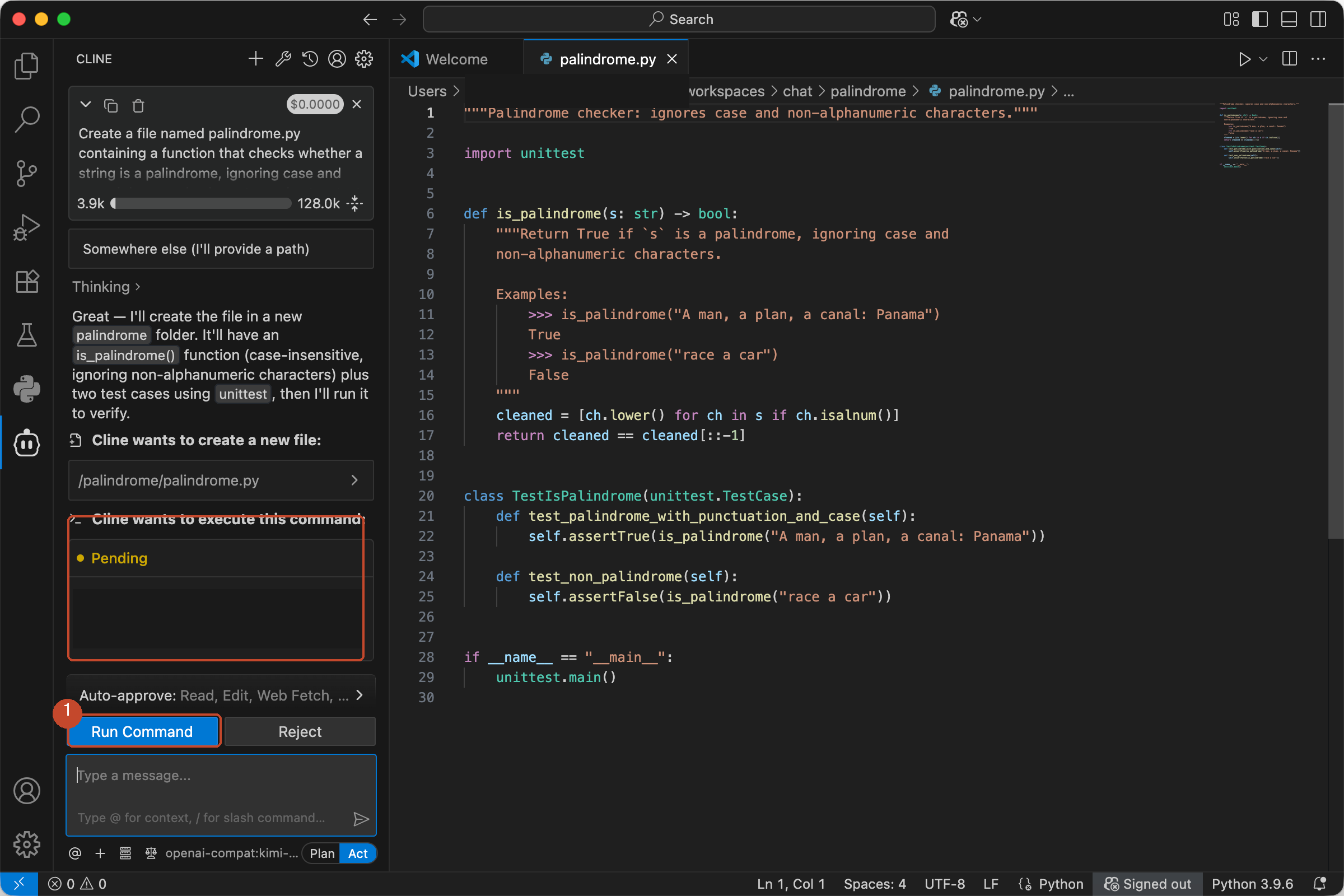
Approve the command. Both tests should pass:
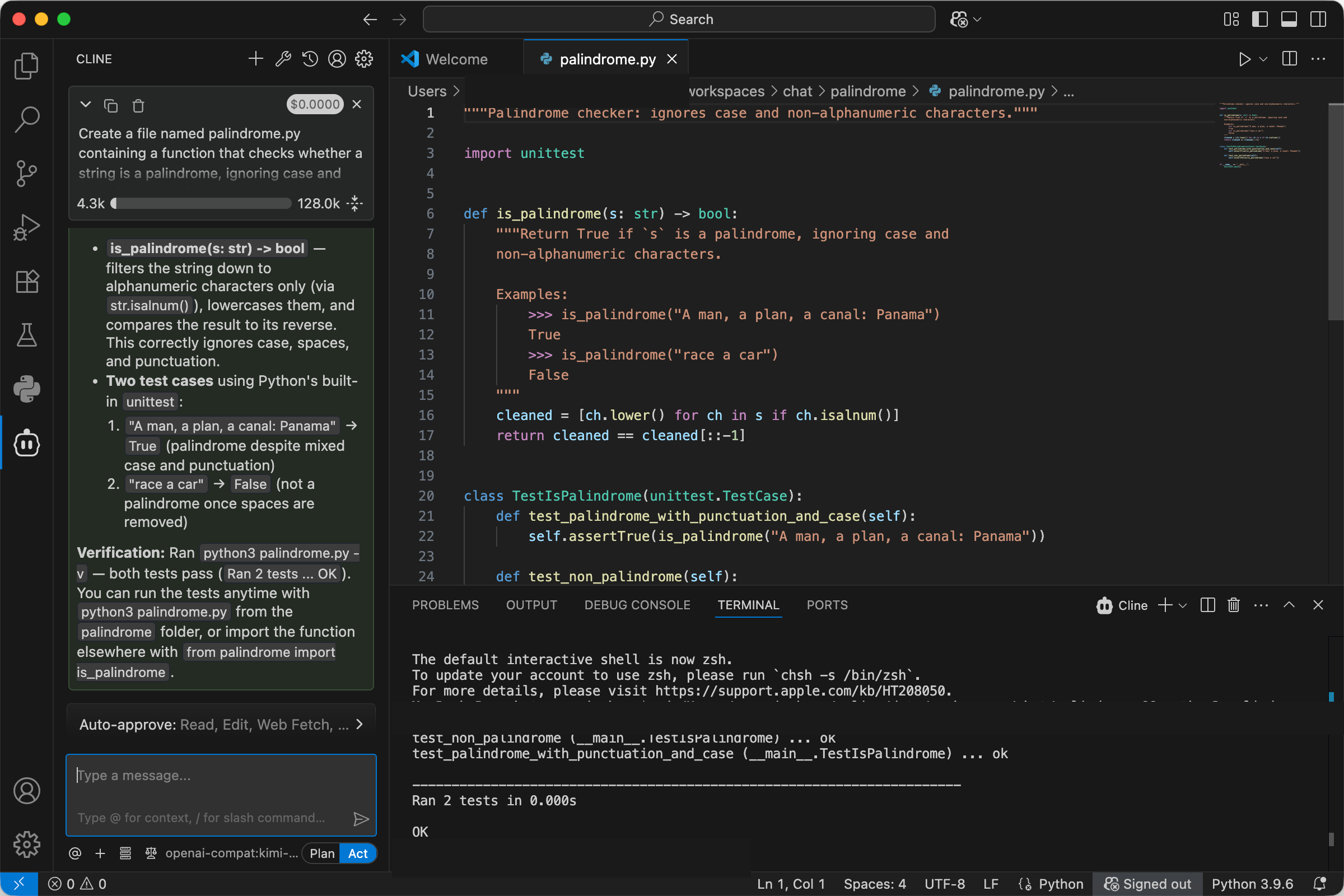
If you receive an authentication error, confirm the key is copied in full and that your account has credit. If you receive a model-not-found error, check that the Model ID is exactly kimi-k3. For everything else we have hit, from context-window fallbacks to $0.00 cost columns to 429s, the fixes are in Cline + Kimi K3: every error we've hit, and the fix.
Pricing
Per 1M tokens, as of October 2026 — current rates always on the pricing page:
| Wallaby | Official list | |
|---|---|---|
| Input | $2.70 | $3.00 |
| Cached input | $0.27 | $0.30 |
| Output | $13.50 | $15.00 |
Our rate is a flat 10% below the official list price, every day. The 18-provider Kimi K3 price comparison has the full table. The $0.50 trial credit covers approximately 185,000 input tokens at that rate, enough for the verification step above and several real tasks. The minimum top-up is $20.
Rolling out to a team
Cline's settings live on each developer's machine; the account side carries the team mechanics. One prepaid balance caps the whole team's spend, each developer gets a named key with its own dollar cap and optional expiry, and the usage log itemizes spend per key, so per-person attribution is the default view. We never log prompts or completions, and we never train on your data. There are no seat fees: adding a teammate costs exactly what they burn. Teams spending over $500 a month can email [email protected] for volume pricing. The full walkthrough is in One endpoint, one bill.
What you built / Where to go next
You now have Cline running kimi-k3 through its built-in Wallaby provider: five hand-filled fields, a cost display that means something, and a reasoning-effort dial you have seen priced against real work.
- Deeper: Cline + Kimi K3: every error we've hit, and the fix collects the seven failure modes we have hit, symptom to fix
- Sideways: How to Use Kimi K3 in pi runs the same key in a terminal agent
- Forward: create an account and the $0.50 trial credit covers the whole verification above
Every request lands on your invoice as an itemized line with token counts — no content logs, no training on your data, no usage reports built from your traffic. We host open-weight models only, keep a public status page, and run our own work through the same gateway we sell.