OpenAI's Codex CLI supports custom model providers through its config profiles, which means you can run its full agent loop — shell commands, file edits, multi-step tasks — on the kimi-k3 reasoning model from Moonshot AI. This guide uses Codex CLI v0.154.0 and was verified end to end on macOS. Disclosure: Wallaby Token sells API access to kimi-k3, and the endpoint below is ours.
Two things to know before you start:
- Use the terminal CLI, not the desktop app. The Codex desktop app only works with an OpenAI account and its own models — there is no custom provider setting. The CLI (and the VS Code extension, which reads the same config) is where custom endpoints live.
- Codex now speaks the OpenAI Responses API only. Older guides that set
wire_api = "chat"no longer work — Codex removed chat-completions support entirely. Our endpoint accepts Responses API traffic natively, so the configuration below is all you need; no local proxy, no patches. - Signed in with a ChatGPT account? GPT-5.5 retires from Codex on October 14, 2026 — see what to use instead, including the custom-provider option the announcement skips.
What you need
- A Wallaby Token API key (create an account at wallabytoken.com; new accounts receive $0.50 in free credit)
- Codex CLI v0.154 or later:
npm install -g @openai/codex(check withcodex --version)
Setup
Codex loads custom providers from a profile file. Create ~/.codex/wallaby.config.toml with this content:
model = "kimi-k3"
model_provider = "wallaby"

[model_providers.wallaby]
name = "Wallaby"
base_url = "https://api.wallabytoken.com/v1"
env_key = "WALLABY_API_KEY"
wire_api = "responses"
Two details matter here. The provider block must live in its own <name>.config.toml file — putting [profiles.wallaby] inside the main config.toml makes Codex refuse to start on current versions. And wire_api must be "responses"; the old "chat" value now produces a hard error at startup.
Then export your key and launch with the profile:
export WALLABY_API_KEY="sk-your-wallaby-key"
codex --profile wallaby
On Windows PowerShell, set the key with $env:WALLABY_API_KEY = "sk-your-wallaby-key" instead. The export applies to the current terminal window only — new windows need it again.
If the profile loaded correctly, the welcome screen shows model: kimi-k3:
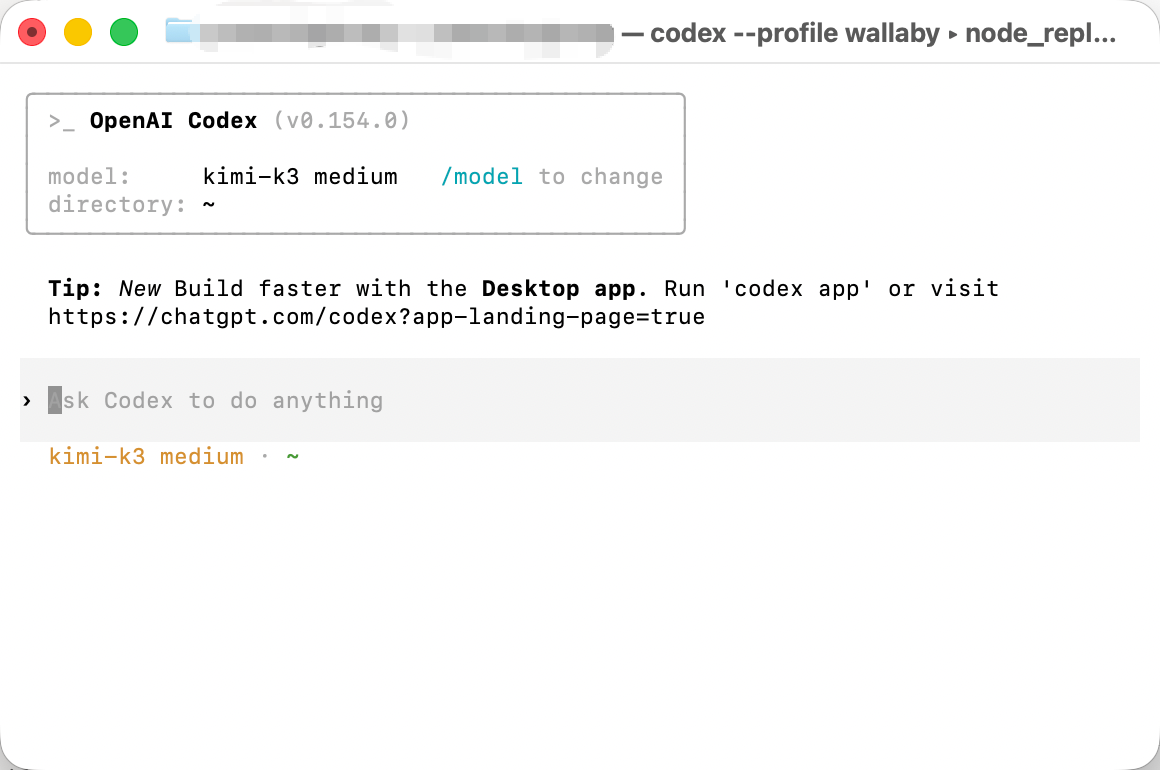
You may see a yellow warning that model metadata for kimi-k3 was not found. It is harmless: Codex does not know kimi-k3's context limits and falls back to conservative defaults. The model itself runs normally.
Verify the configuration
Give Codex a small but real task — one that exercises the whole agent loop, not just chat:
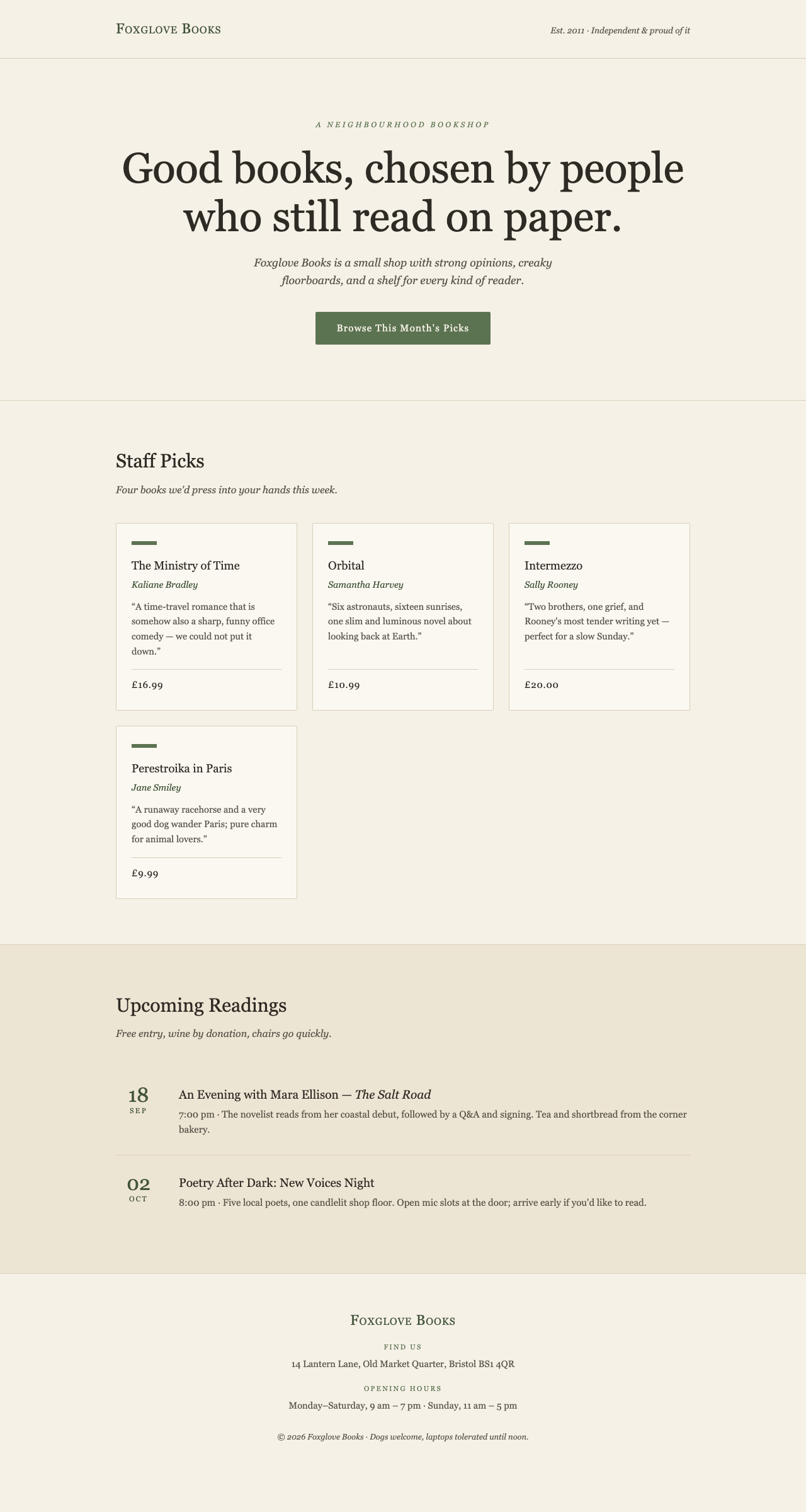
Create a single-file landing page for an independent bookstore called "Foxglove Books". Warm, editorial style — think cream paper background, serif headlines, muted green accents. Sections: hero with a tagline and a CTA, a "Staff Picks" grid with 4 books (title, author, one-line recommendation, price), an events section listing 2 upcoming readings, and a footer with address and opening hours. All in one index.html with inline CSS, no external dependencies. Save it in a new folder called bookstore-landing.
Codex will scaffold the folder, write the file, and report what it built. Our run finished in about two minutes:
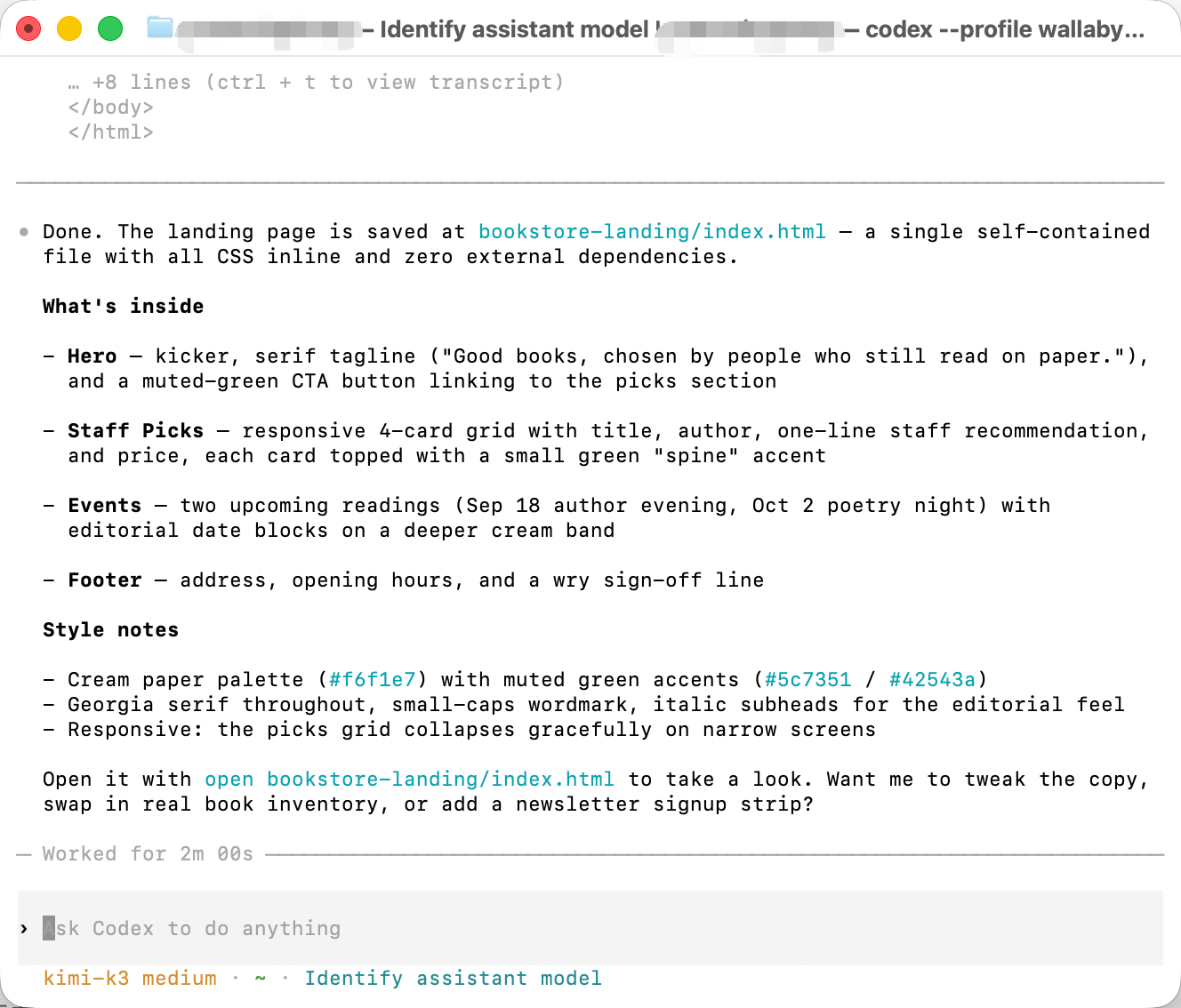
And the resulting page, opened straight from disk — or view the live copy, byte for byte what Codex produced:
If you receive an authentication error, confirm the key is copied in full, that the environment variable is set in the same window, and that your account has credit.
Known quirks (and how to handle them)
The first turn is slow. Codex sends a system prompt of roughly ten thousand tokens with every session, and kimi-k3 is a reasoning model that thinks before it answers. Expect around twenty seconds before the first visible output; subsequent turns feel faster. This is the agent framework's overhead plus reasoning latency, not a connection problem.
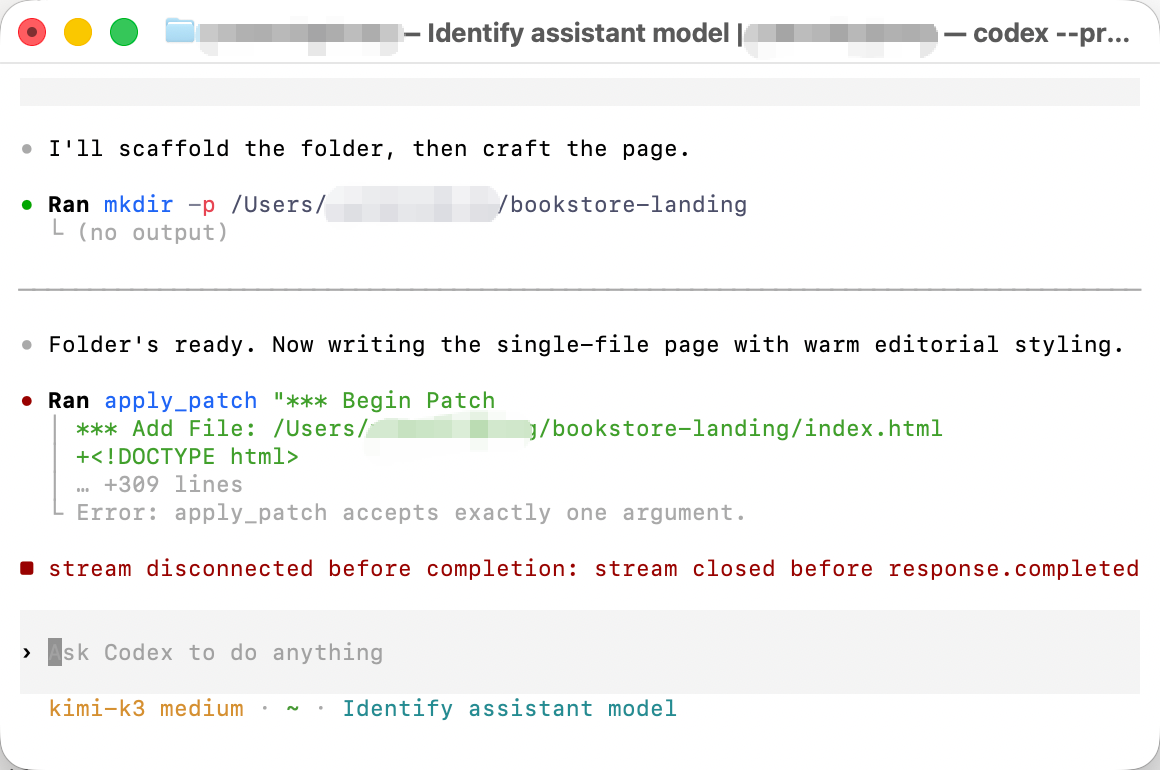
apply_patch may stumble on the first write. kimi-k3 occasionally calls Codex's file-editing tool with arguments in the wrong shape. You will see Error: apply_patch accepts exactly one argument — and then, in normal operation, Codex feeds the error back to the model, which retries with a different approach and succeeds:
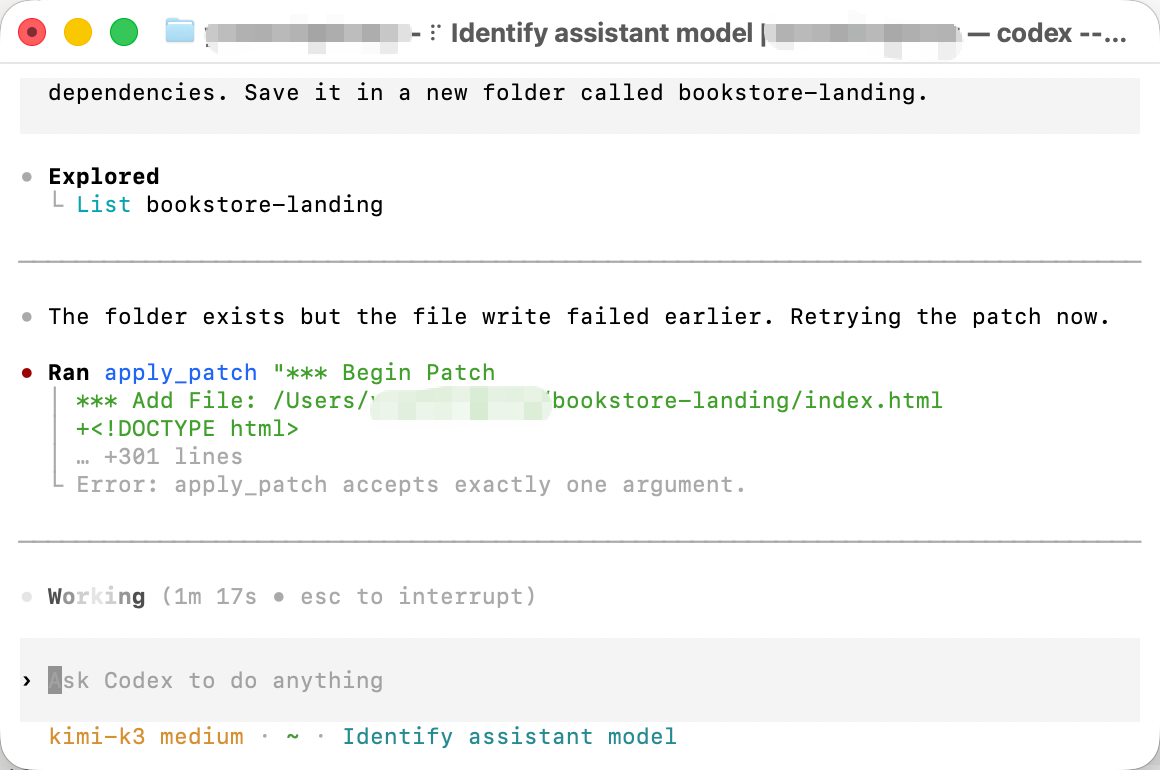
You do not need to intervene. If it somehow does not recover on its own, tell it: apply_patch takes exactly one string argument — pass the entire patch as a single string. Retry writing the file.
stream disconnected before completion. If you ever see this red message, your session is not lost — just type continue and Codex picks up where it left off:
When it is not transient. If the same message appears before any output, with Reconnecting... 1/5 through 5/5, the session cannot start at all: the key or the base URL is usually the cause. We put the tested triage table in Codex stream disconnected before completion.
Sampling parameters are normalized. The serving stack fixes its own sampling settings, so any temperature you set in a client is normalized rather than applied. Nothing to configure — just do not be surprised that changing it has no effect.
No built-in web search. Codex advertises a hosted web-search tool, but hosted search is a serving-side feature that this endpoint does not provide. For coding work it rarely matters: Codex's shell tool works, so curl and friends are available, and editor-based agents such as Cline fetch web pages on the client side anyway.
Which tool should you use: Codex or Cline?
We publish both guides because you will search for both — not because the two cost the same. Here is the honest meter, from our own logs. Same class of task (one prompt → a complete landing page), same model, same endpoint:
| Codex CLI (bookstore page) | Cline (coffee shop page) | |
|---|---|---|
| Requests | 5 (incl. one self-recovery) | 2 |
| Input tokens | 91,155 — of which 85k served from cache | 47,469 |
| Output tokens | 5,987 | 9,486 |
| Total cost | $0.16 | $0.21 |
Same ballpark — but the money goes to completely different places. Codex resends its ~10k-token framework prompt every turn; on an endpoint with prompt caching, 93% of that lands at one-tenth price, so the overhead is largely absorbed. Cline's overhead is smaller, but its one-shot style wrote 27 KB of output in a single burst — and output tokens cost five times input.
Where Codex's tax is real: light usage. A bare say ok through Codex costs 9,481 tokens before the model even starts answering — hundreds of times a bare API call. For quick questions and small edits, that is money for nothing.
Our recommendation: daily driver, use Cline — controllable overhead, client-side web reading, and per-task cost display once you set the price fields. Reserve Codex for the large multi-step tasks it is genuinely good at, where its framework weight is amortized and the cache does its work. If you only remember one line: never chat casually with a coding agent; give it a task worth its system prompt. All of our terminal and coding-tool setups are collected in the Kimi K3 CLI hub; for reverse-engineering work specifically, we verified a different setup end to end — REA on Kimi K3 with Claude Code.
Pricing
All prices are per 1M tokens.
| Wallaby | Official list | |
|---|---|---|
| Input | $2.70 | $3.00 |
| Cached input | $0.27 | $0.30 |
| Output | $13.50 | $15.00 |
Our rate is a flat 10% below the official list price, every day. The $0.50 trial credit is enough to complete the verification task above several times over. The minimum top-up is $20.
For a cross-provider view — 18 providers, input / cached-input / output columns blended at a coding-agent workload — see our Kimi K3 API pricing comparison.
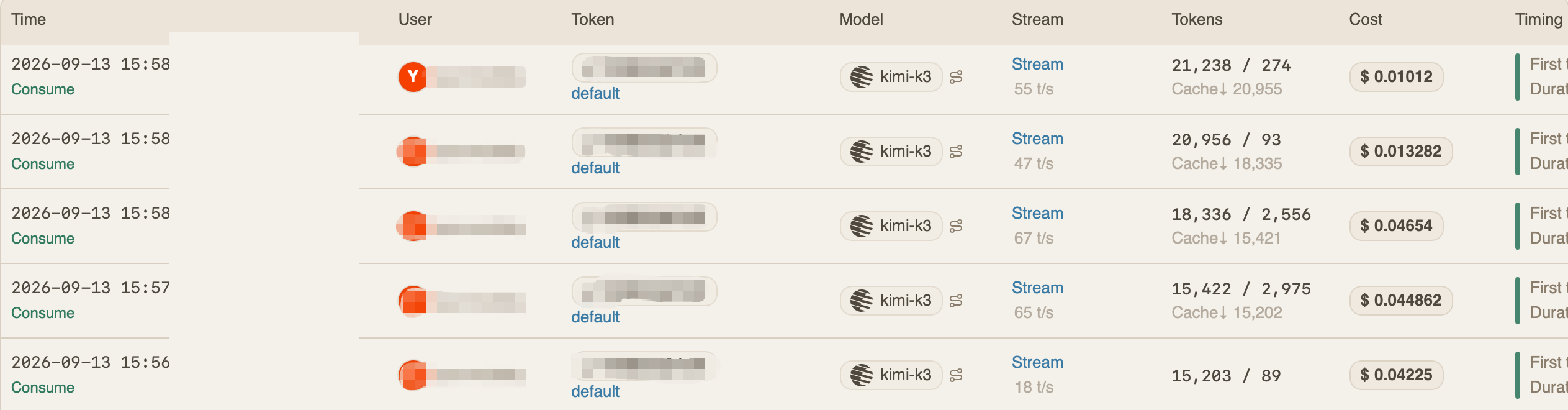
The verification task from this guide, itemized in the dashboard seconds after it finished: five requests, 91k input tokens (85k of them served from cache at one-tenth the price), 6k output tokens, $0.16 in total — with per-request timing and throughput on every line:
Get started
Create an account at wallabytoken.com to receive $0.50 in free trial credit, then set up the profile above. Per-request billing settles in seconds, so the dashboard reflects your usage almost immediately after each request. Prefer YAML over a profile file? Hermes takes four lines.
Every request lands on your invoice as an itemized line with token counts — no content logs, no training on your data, no usage reports built from your traffic. We host open-weight models only, keep a public status page, and run our own work through the same gateway we sell.